Product Designer (UX/UI)
Product Designer (UX/UI)
FlyLow
FlyLow
FlyLow
Optimising the Flight Booking Journey with AI-Assisted Seat Selection
Optimising the Flight Booking Journey with AI-Assisted Seat Selection
Optimising the Flight Booking Journey with AI-Assisted Seat Selection
Role
Product Designer
Tools
Figma & Miro
Timeline
Jan — Mar 2025
Project Type
Concept Flight-Booking Platform
Role
Product Designer
Tools
Figma & Miro
Timeline
Jan — Mar 2025
Project Type
Concept Flight-Booking Platform
Role
Product Designer
Timeline
Jan — Mar 2025
Tools
Figma & Miro
Project Type
Concept Flight-Booking Platform
Project Overview
Project Overview
Project Overview
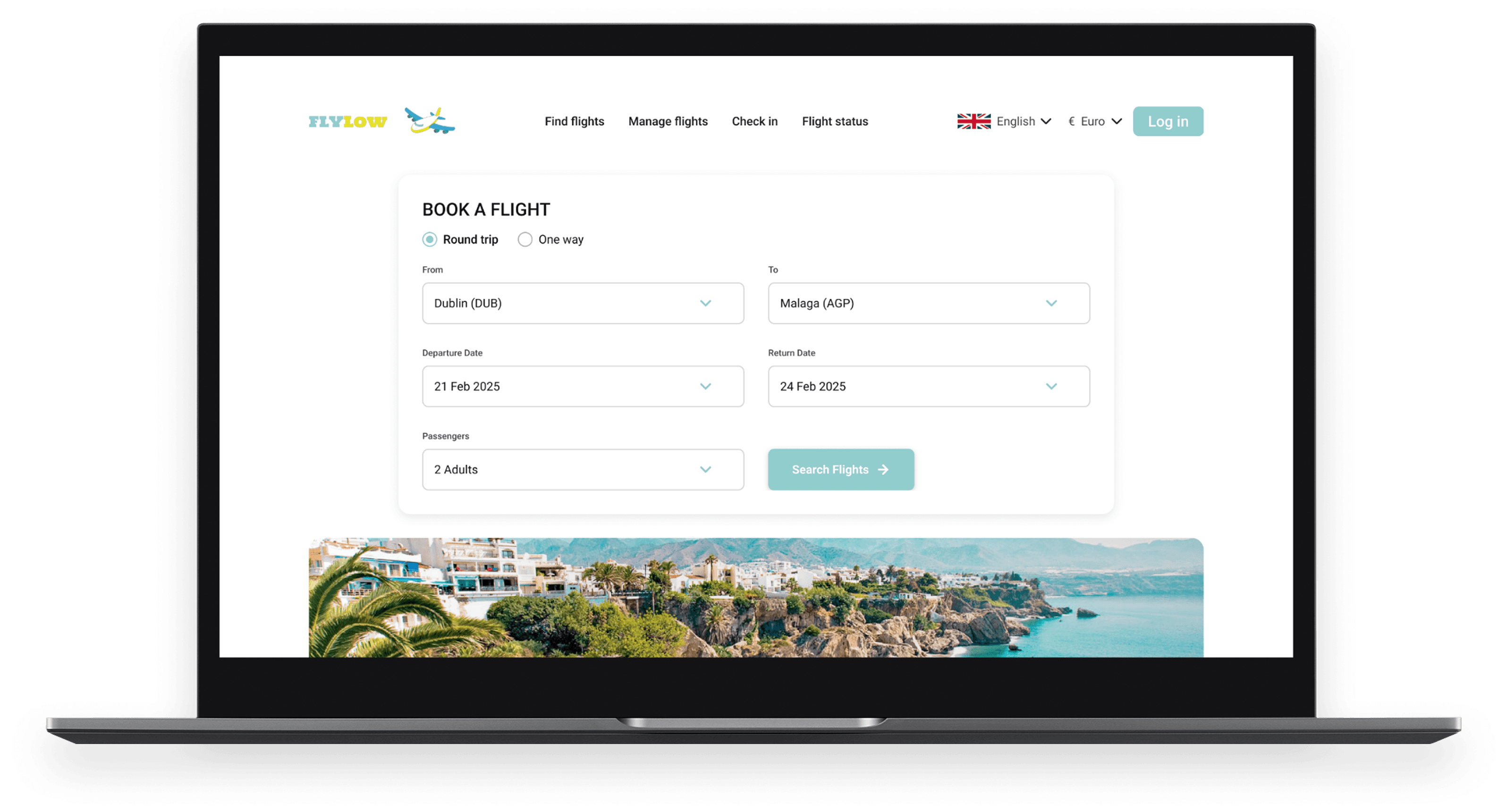
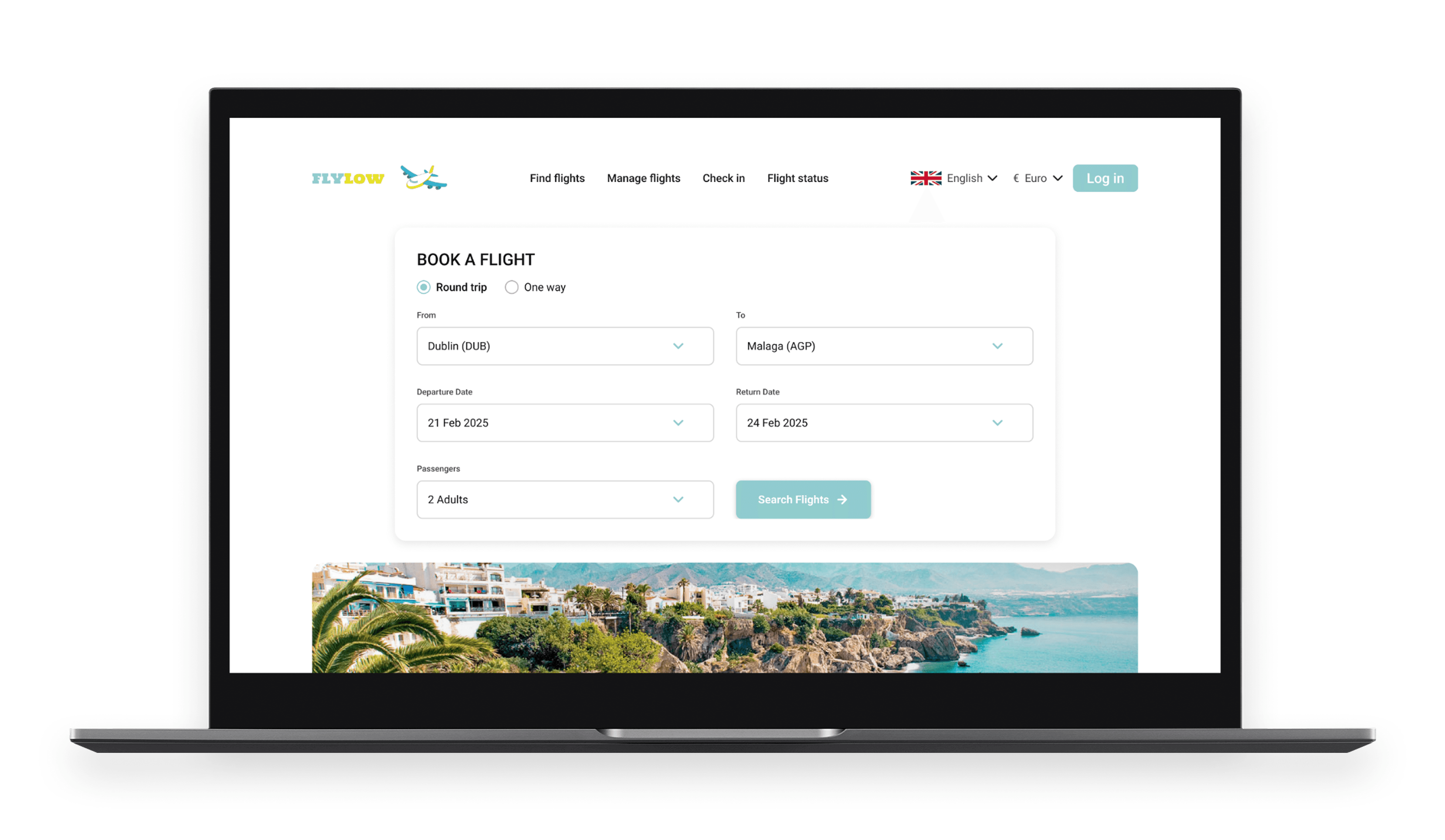
FlyLow is a concept flight-booking platform for desktop designed to address common pain points in low-cost airline experiences. The project focuses on simplifying flight comparison, streamlining passenger flows, and introducing AI-assisted seat selection to reduce decision fatigue and improve booking efficiency.
FlyLow is a concept flight-booking platform for desktop designed to address common pain points in low-cost airline experiences. The project focuses on simplifying flight comparison, streamlining passenger flows, and introducing AI-assisted seat selection to reduce decision fatigue and improve booking efficiency.
FlyLow is a concept flight-booking platform for desktop designed to address common pain points in low-cost airline experiences. The project focuses on simplifying flight comparison, streamlining passenger flows, and introducing AI-assisted seat selection to reduce decision fatigue and improve booking efficiency.
PROBLEM
PROBLEM
PROBLEM
Cluttered Flight Booking Platforms Slow Users Down with Unclear Pricing and Time-Consuming Seat Selection.
Cluttered Flight Booking Platforms Slow Users Down with Unclear Pricing and Time-Consuming Seat Selection.
Cluttered Flight Booking Platforms Slow Users Down with Unclear Pricing and Time-Consuming Seat Selection.
Cluttered interfaces, aggressive upselling, and poorly structured booking flows distract users from their primary goal to complete a booking quickly and with confidence.
Cluttered interfaces, aggressive upselling, and poorly structured booking flows distract users from their primary goal to complete a booking quickly and with confidence.
Cluttered interfaces, aggressive upselling, and poorly structured booking flows distract users from their primary goal to complete a booking quickly and with confidence.
SOLUTION
SOLUTION
SOLUTION
Design a Faster, Cleaner Flight Booking Experience by Simplifying the Booking Flow and Introducing AI-Assisted Seat Selection.
Design a Faster, Cleaner Flight Booking Experience by Simplifying the Booking Flow and Introducing AI-Assisted Seat Selection.
Design a Faster, Cleaner Flight Booking Experience by Simplifying the Booking Flow and Introducing AI-Assisted Seat Selection.
Reduce steps and pages to support a faster booking flow
Reduce steps and pages to support a faster booking flow
Reduce steps and pages to support a faster booking flow
Clarify pricing and inclusions at every stage of the journey
Clarify pricing and inclusions at every stage of the journey
Clarify pricing and inclusions at every stage of the journey
Introduce AI-assisted seat selection to reduce decision fatigue
Introduce AI-assisted seat selection to reduce decision fatigue
Introduce AI-assisted seat selection to reduce decision fatigue
Your Window Seat View of FlyLow
Your Window Seat View of FlyLow
Your Window Seat View of FlyLow

RESEARCH
Competitive Benchmarking
CTA Visibility
Form Clarity
Pricing Clarity
Seat Selection

Aer Lingus
✓
✓
✓
✓
CTA Visibility
Form Clarity
Pricing Clarity
Seat Selection
Ryanair
✕
✓
✓
✕
CTA Visibility
Form Clarity
Pricing Clarity
Seat Selection

Jet2
✕
✕
✓
✓
CTA Visibility
Form Clarity
Pricing Clarity
Seat Selection

EasyJet
✓
✕
✕
✕
Choice Overload Hurts Seat Selection
Ryanair’s booking journey is frequently disrupted by pop-ups and advertising, while its seat selection tools offer too many options, making decisions harder rather than easier
EasyJet’s booking flow relies on long, unnecessary forms, and its seat map is visually cluttered with prices and prompts that compete with the act of choosing a seat
USER SURVEYS
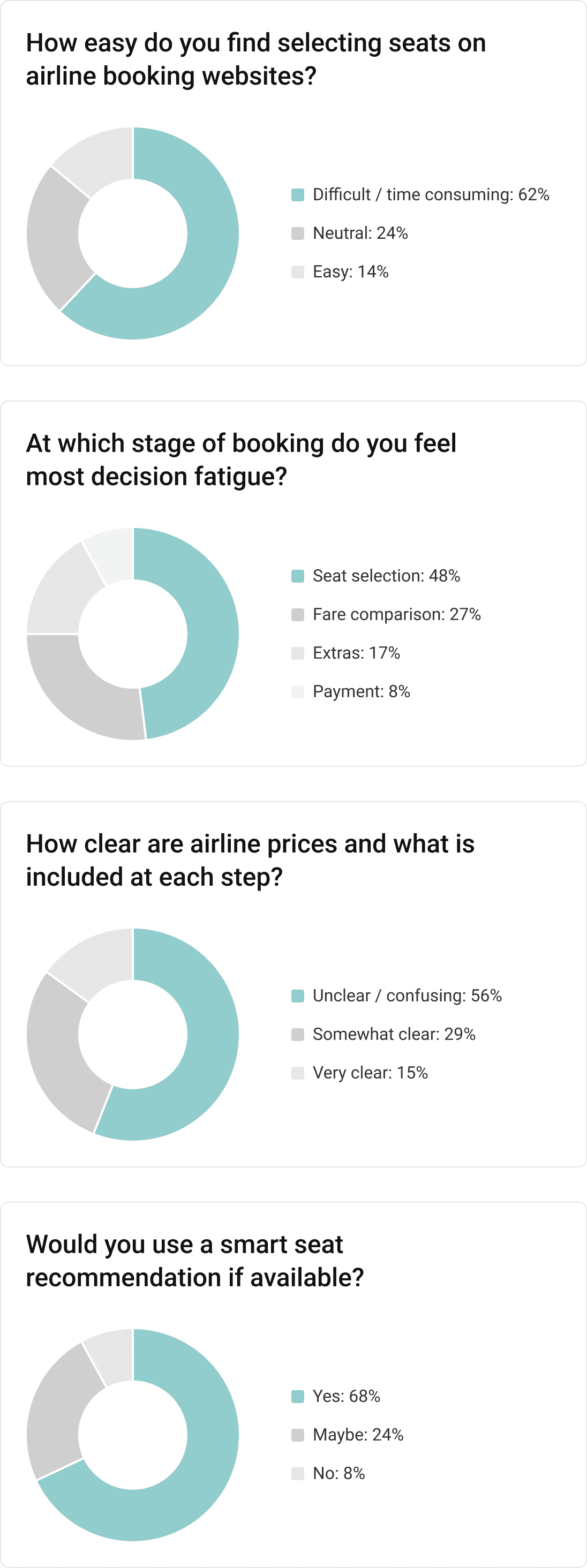
48% of Users Experience Descision Fatigue at Seat Selection
I created a short Google Forms survey to gather quantitive insights into common flight booking pain points.The survey received 23 responses and helped validate key design decisions, particularly around seat selection and price clarity.
RESEARCH
RESEARCH
Competitive Benchmarking
Competitive Benchmarking
Criteria
Aer Lingus
Ryanair
Jet2
EasyJet
CTA Visibility
✓
✕
✕
✓
Form Clarity
✓
✓
✕
✕
Pricing Clarity
✓
✓
✓
✕
Seat Selection
✓
✕
✓
✕
Choice Overload Hurts Seat Selection
Choice Overload Hurts Seat Selection
Ryanair’s booking journey is frequently disrupted by pop-ups and advertising, while its seat selection tools offer too many options, making decisions harder rather than easier
Ryanair’s booking journey is frequently disrupted by pop-ups and advertising, while its seat selection tools offer too many options, making decisions harder rather than easier
EasyJet’s booking flow relies on long, unnecessary forms, and its seat map is visually cluttered with prices and prompts that compete with the act of choosing a seat
EasyJet’s booking flow relies on long, unnecessary forms, and its seat map is visually cluttered with prices and prompts that compete with the act of choosing a seat
USER SURVEYS
USER SURVEYS
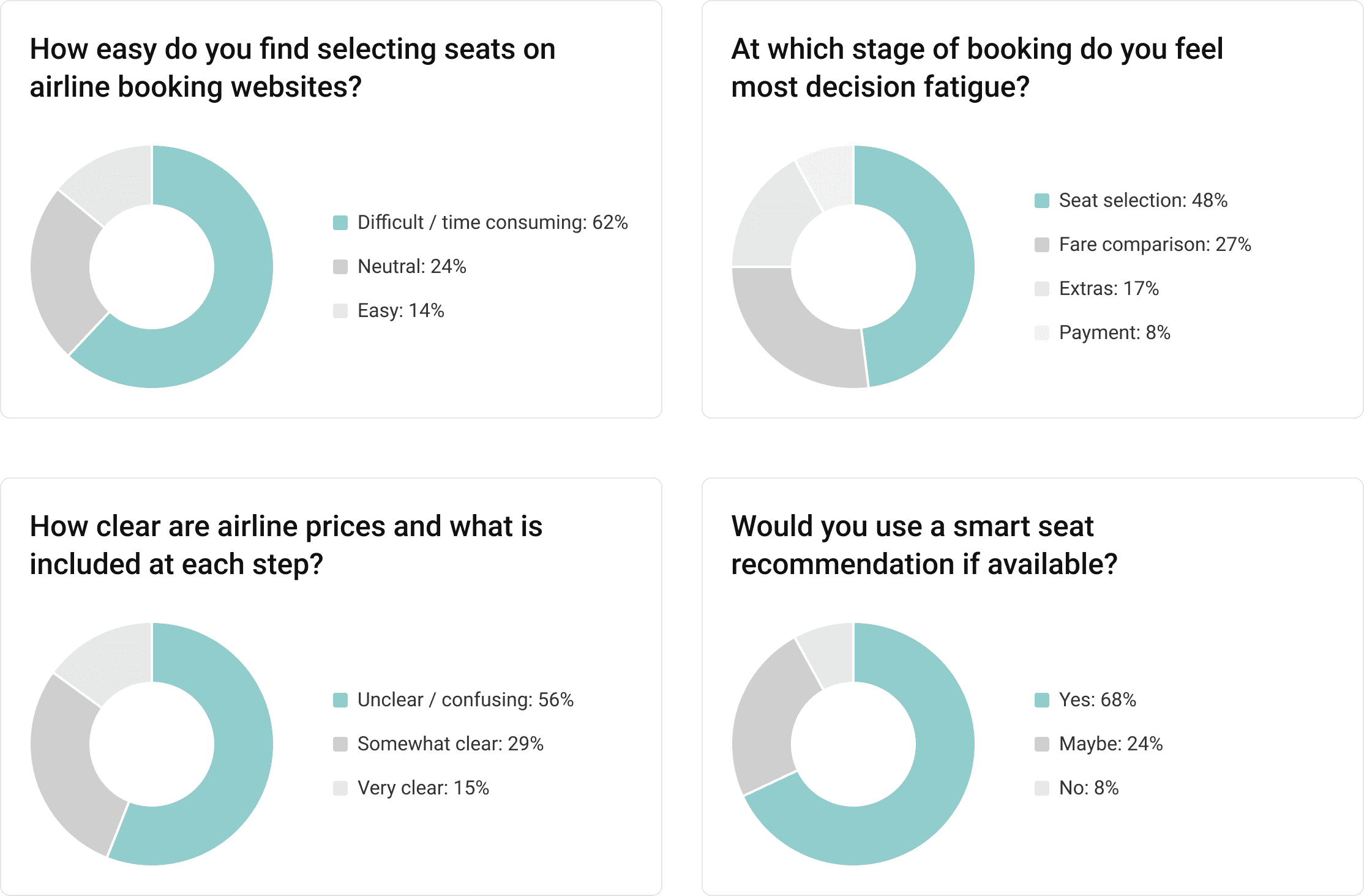
48% of Users Experience Decision Fatigue at Seat Selection
48% of Users Experience Decision Fatigue at Seat Selection
I created a short Google Forms survey to gather quantitive insights into common flight booking pain points.The survey received 23 responses and helped validate key design decisions, particularly around seat selection and price clarity.
I created a short Google Forms survey to gather quantitive insights into common flight booking pain points.The survey received 23 responses and helped validate key design decisions, particularly around seat selection and price clarity.
USABILITY TESTING
USABILITY TESTING
USABILITY TESTING
Clutterred Seat Maps and Hidden Pricing Slow Seat Selection
Clutterred Seat Maps and Hidden Pricing Slow Seat Selection
Clutterred Seat Maps and Hidden Pricing Slow Seat Selection
6 users were tested as they went through the flight booking process from homepage to checkout on Aer Lingus, Ryanair, EasyJet and Jet2.
6 users were tested as they went through the flight booking process from homepage to checkout on Aer Lingus, Ryanair, EasyJet and Jet2.
6 users were tested as they went through the flight booking process from homepage to checkout on Aer Lingus, Ryanair, EasyJet and Jet2.
What Worked Well
What Worked Well
What Worked Well
✓
Origin and destination stayed visible and editable throughout the flow
Origin and destination stayed visible and editable throughout the flow
Origin and destination stayed visible and editable throughout the flow
✓
Users liked comparing nearby dates and seeing available flights before selecting a day
Users liked comparing nearby dates and seeing available flights before selecting a day
Users liked comparing nearby dates and seeing available flights before selecting a day
✓
The calendar picker was easy to use, and colour-coding made date selection clear
The calendar picker was easy to use, and colour-coding made date selection clear
The calendar picker was easy to use, and colour-coding made date selection clear
Key Friction Points
Key Friction Points
Key Friction Points
✕
Pop-ups and upselling interruptions broke the flow and felt pushy
Pop-ups and upselling interruptions broke the flow and felt pushy
Pop-ups and upselling interruptions broke the flow and felt pushy
✕
Mandatory login blocked progress and frustrated users who wanted to continue as guests
Mandatory login blocked progress and frustrated users who wanted to continue as guests
Mandatory login blocked progress and frustrated users who wanted to continue as guests
✕
Price breakdowns and basket details were hard to find during the booking flow
Price breakdowns and basket details were hard to find during the booking flow
Price breakdowns and basket details were hard to find during the booking flow
✕
Fare options were text-heavy and difficult to compare quickly
Fare options were text-heavy and difficult to compare quickly
Fare options were text-heavy and difficult to compare quickly
✕
Seat maps felt cluttered, making scanning and decision-making slow
Seat maps felt cluttered, making scanning and decision-making slow
Seat maps felt cluttered, making scanning and decision-making slow
✕
Ryanair’s seven seat filters overwhelmed users and created confusion
Ryanair’s seven seat filters overwhelmed users and created confusion
Ryanair’s seven seat filters overwhelmed users and created confusion

Context
A mother of three who books family trips during school holidays.
Priorities
Find affordable flights quickly & ensure the family sits together.
Pain points
Cluttered seat maps, unclear pricing, and aggressive upselling slow her down.
Jane’s Booking Journey (Before FlyLow)
Context
Context
A mother of three who books family trips during school holidays.
A mother of three who books family trips during school holidays.
Priorities
Priorities
Find affordable flights quickly & ensure the family sits together.
Find affordable flights quickly & ensure the family sits together.
Pain points
Pain points
Cluttered seat maps, unclear pricing, and aggressive upselling slow her down.
Cluttered seat maps, unclear pricing, and aggressive upselling slow her down.
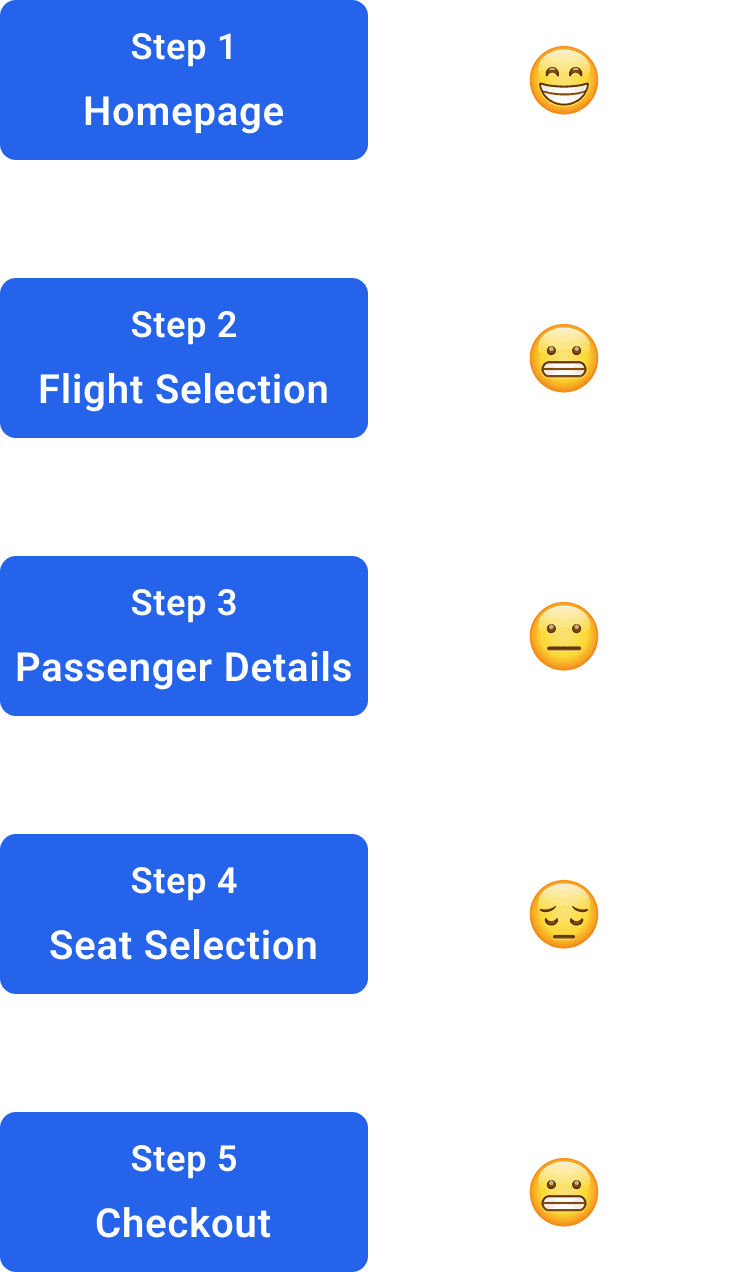
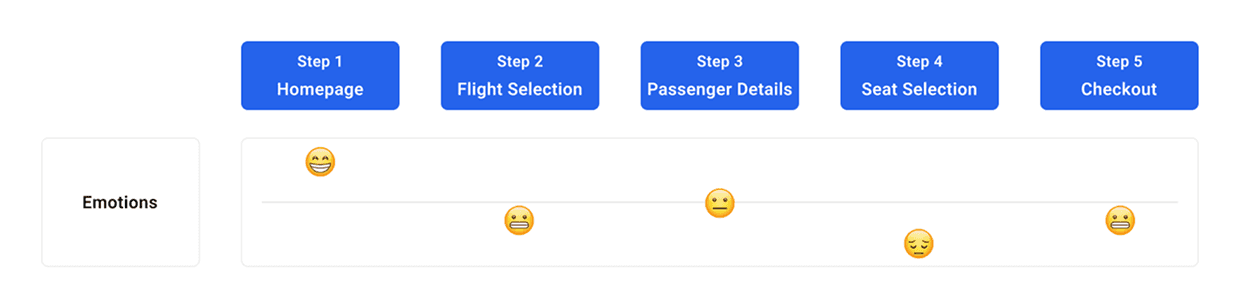
Jane’s Booking Journey (Before FlyLow)
Jane’s Booking Journey (Before FlyLow)
WIREFRAMES
WIREFRAMES
WIREFRAMES
Optional Smart Seat Selection for Decision-Making
Optional Smart Seat Selection for Decision-Making
Optional Smart Seat Selection for Decision-Making
Flight Selection
Flight Selection
Flight Selection
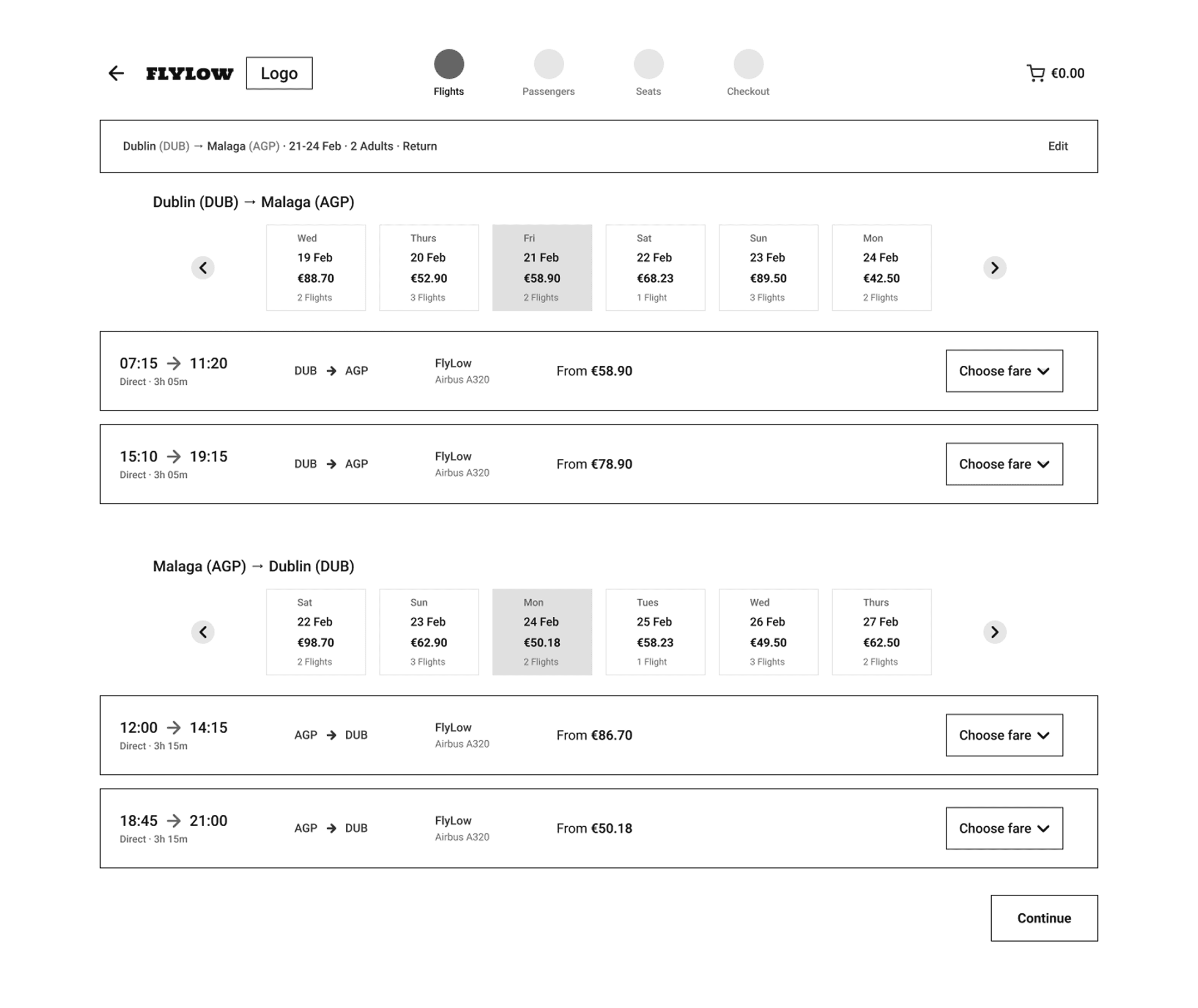
Alternative date carousel shows how many flights are available each day, helping users quickly compare options without changing screens
Alternative date carousel shows how many flights are available each day, helping users quickly compare options without changing screens
Clear visual hierarchy prioritises time, price, and duration, supporting fast scanning and confident decision-making
Clear visual hierarchy prioritises time, price, and duration, supporting fast scanning and confident decision-making
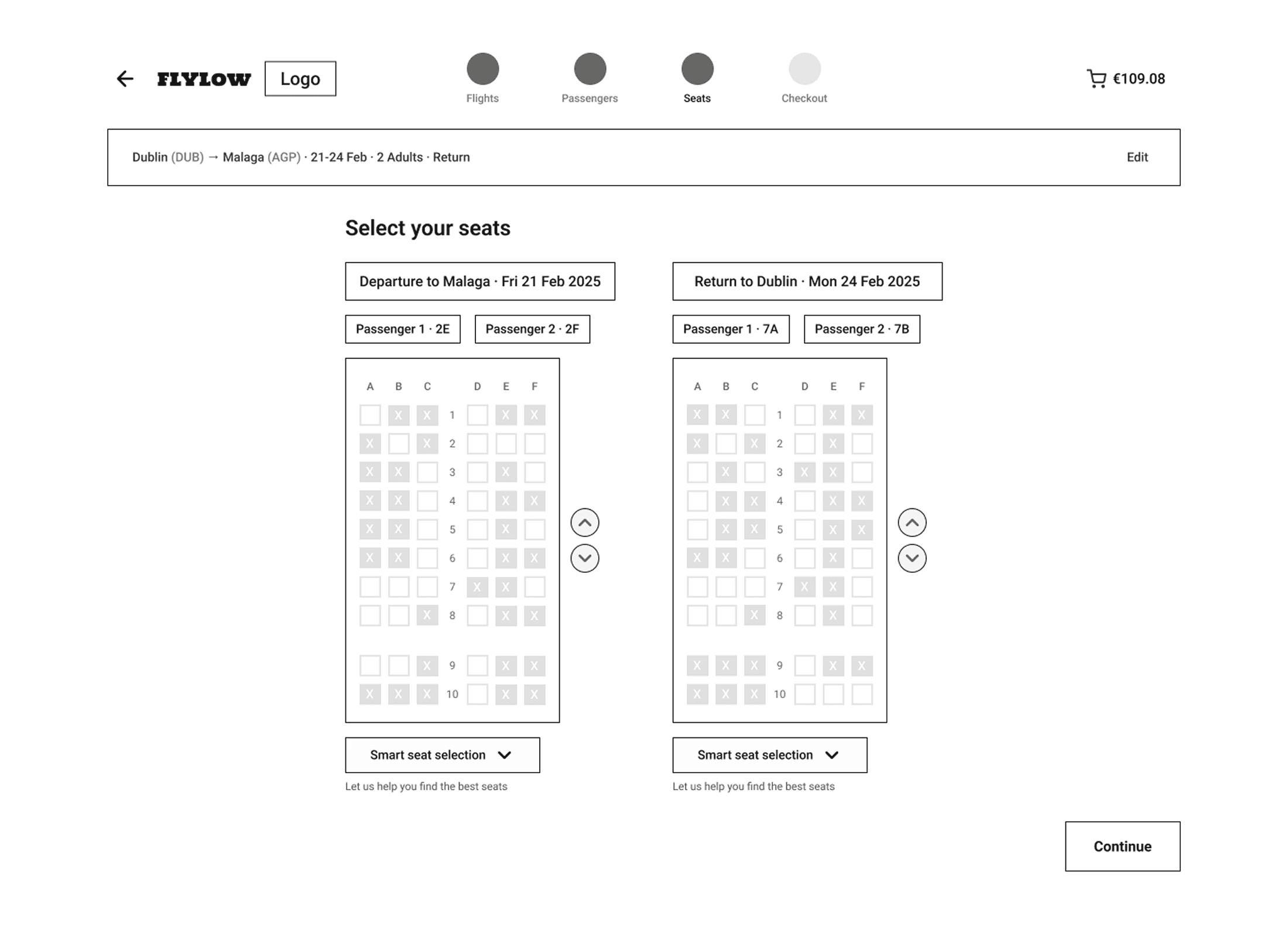
Seat Selection
Seat Selection
Outbound & Return seat map on the same screen so users don’t need to navigate to a second page — reducing clicks and speeding up completion
Outbound & Return seat map on the same screen so users don’t need to navigate to a second page — reducing clicks and speeding up completion
Outbound & Return seat map on the same screen so users don’t need to navigate to a second page — reducing clicks and speeding up completion
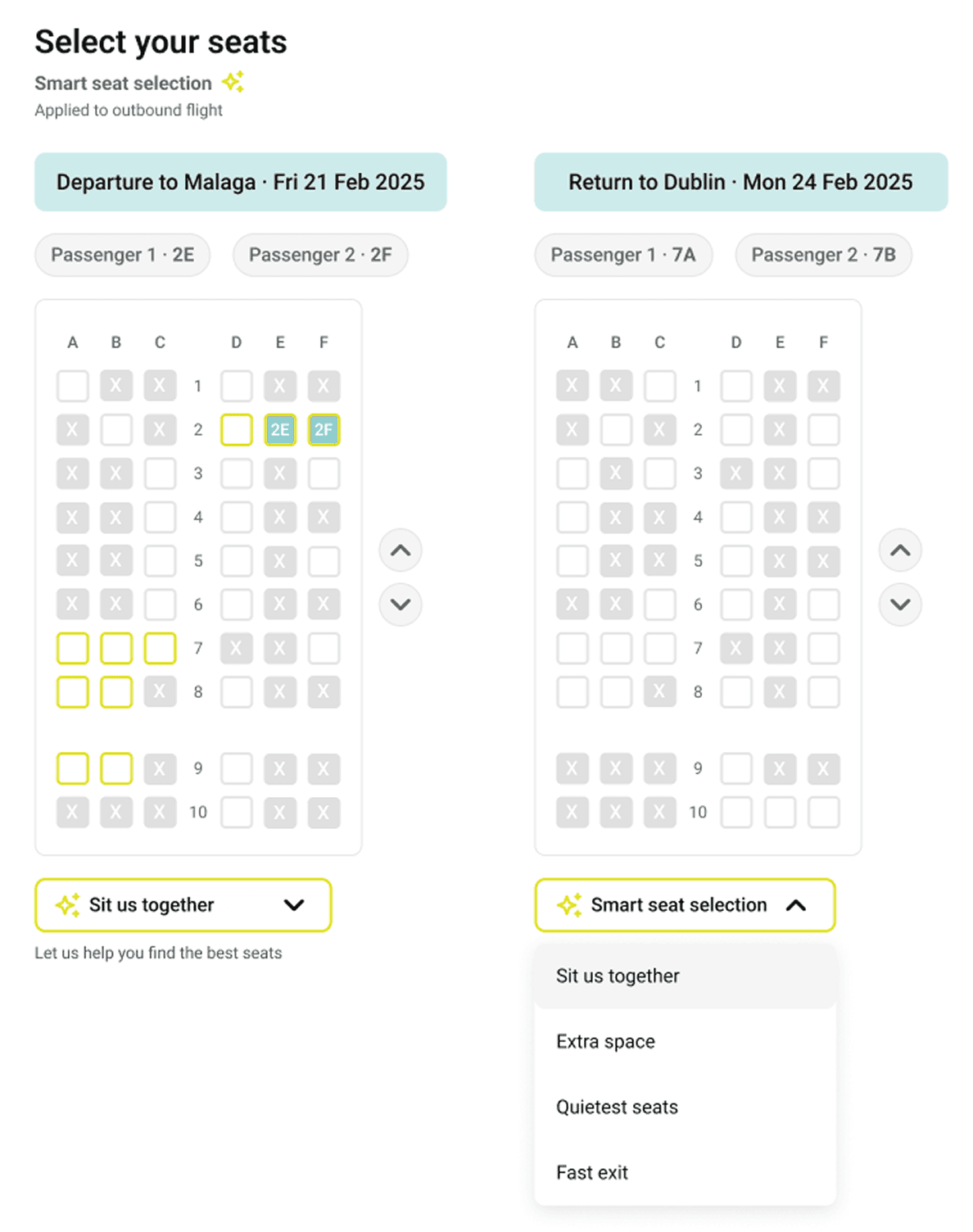
Smart seat selection as an optional helper, placed below seat map to support decision-making without forcing AI interaction
Smart seat selection as an optional helper, placed below seat map to support decision-making without forcing AI interaction
Smart seat selection as an optional helper, placed below seat map to support decision-making without forcing AI interaction
UI DESIGN
Colour System
Colour System
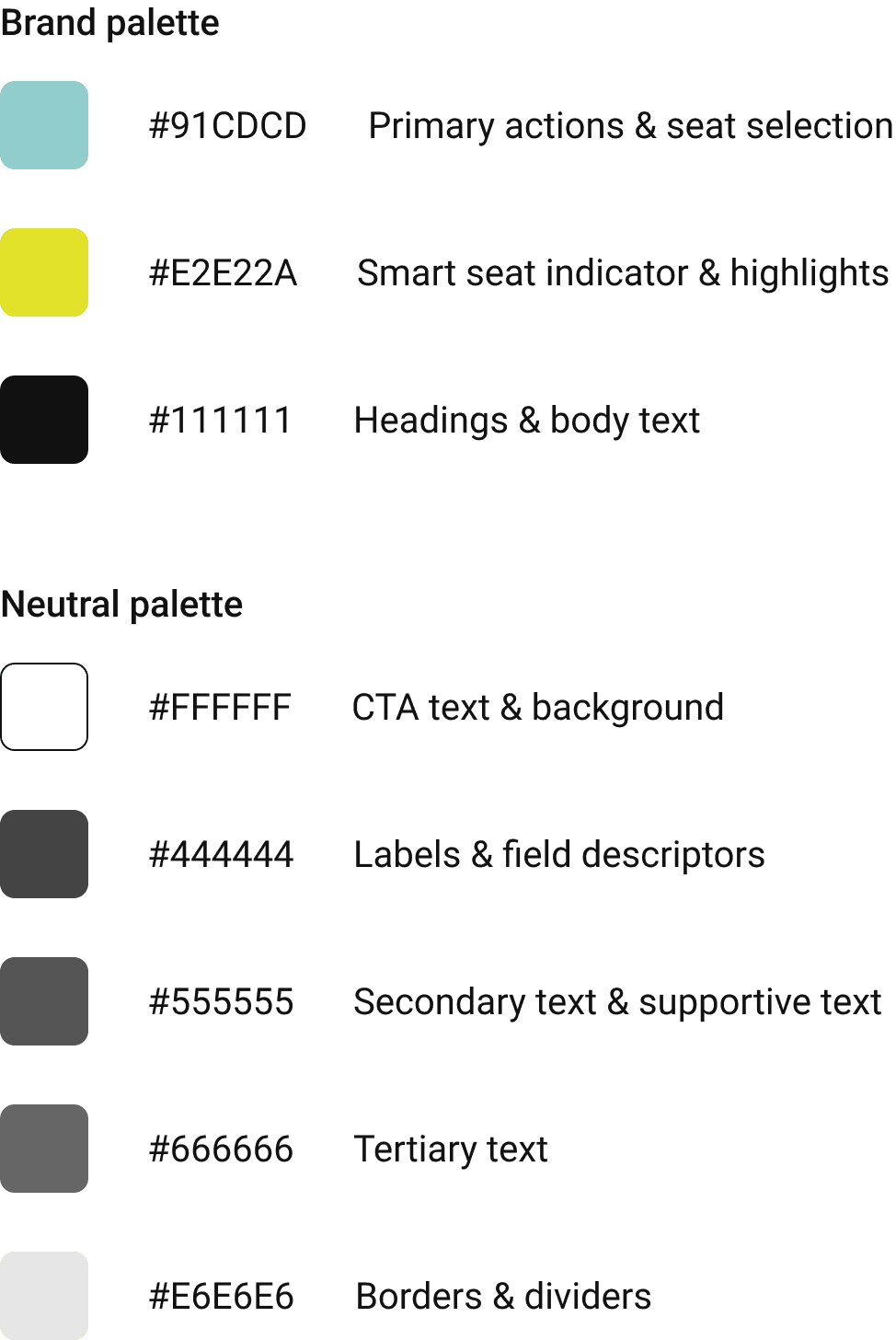
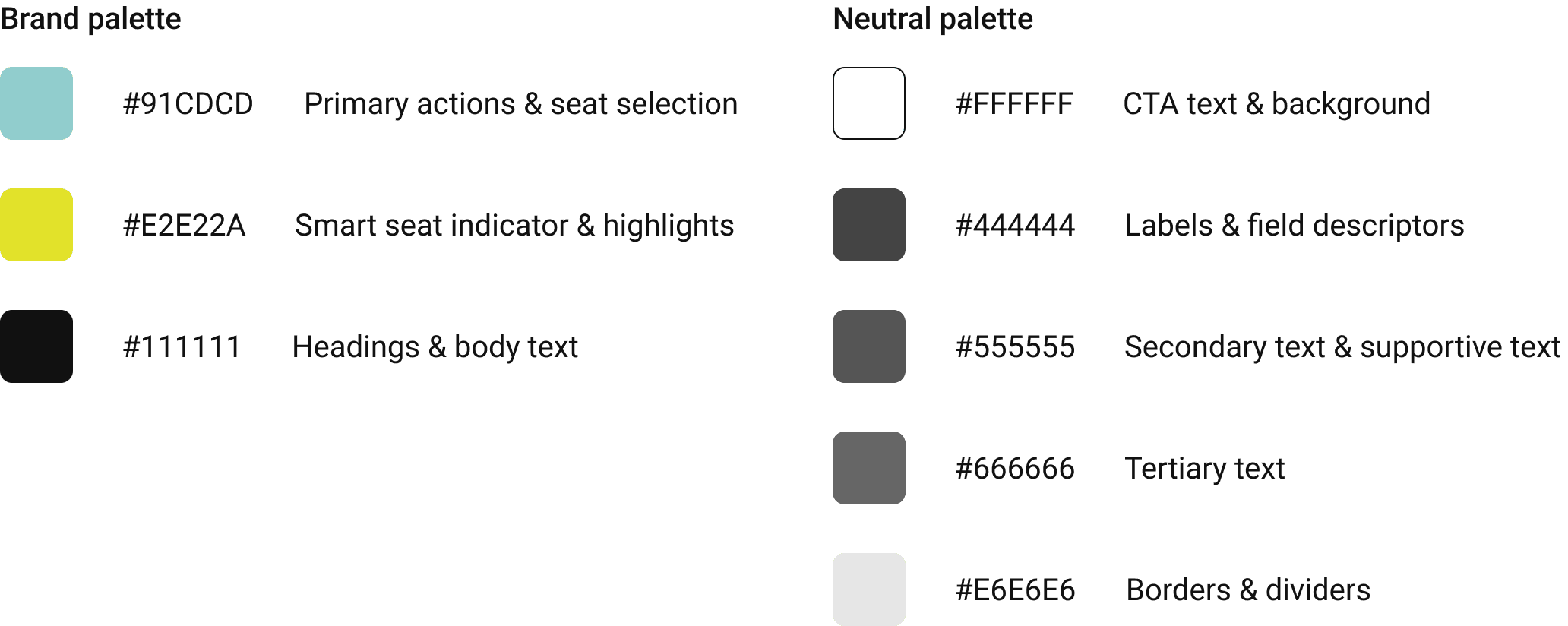
This palette emphasizes clarity and contrast, with brand colours used sparingly to guide action, and neutral greys supporting hierarchy and readability.
This palette emphasizes clarity and contrast, with brand colours used sparingly to guide action, and neutral greys supporting hierarchy and readability.
This palette emphasizes clarity and contrast, with brand colours used sparingly to guide action, and neutral greys supporting hierarchy and readability.
Typography
Typography
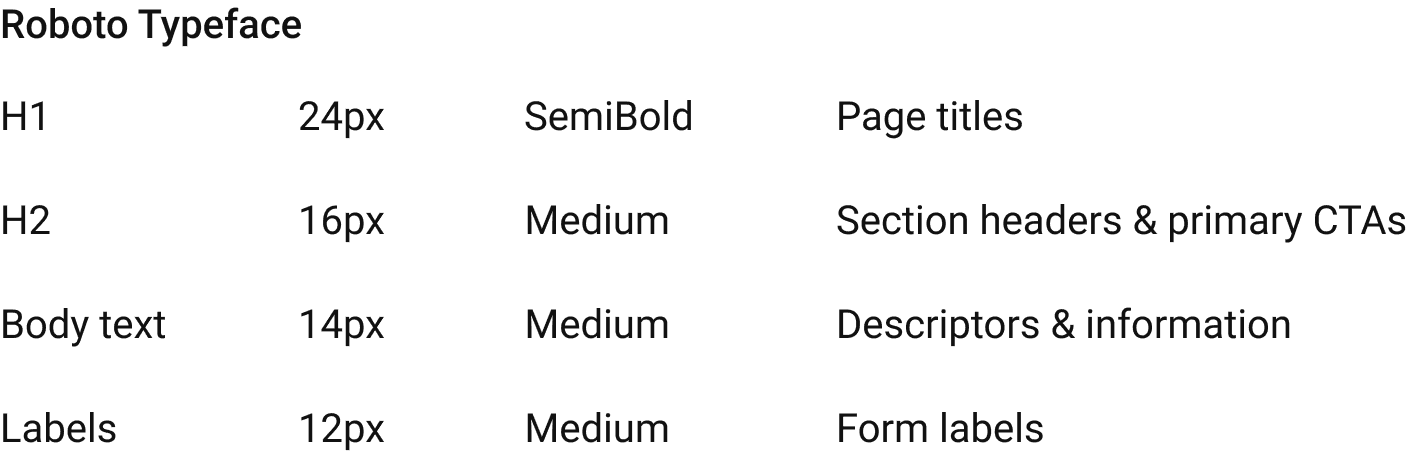
FlyLow uses the Roboto typeface for its readability, versatility, and strong support across digital platforms.
FlyLow uses the Roboto typeface for its readability, versatility, and strong support across digital platforms.
FlyLow uses the Roboto typeface for its readability, versatility, and strong support across digital platforms.
SECOND USABILITY TEST
SECOND USABILITY TEST
SECOND USABILITY TEST
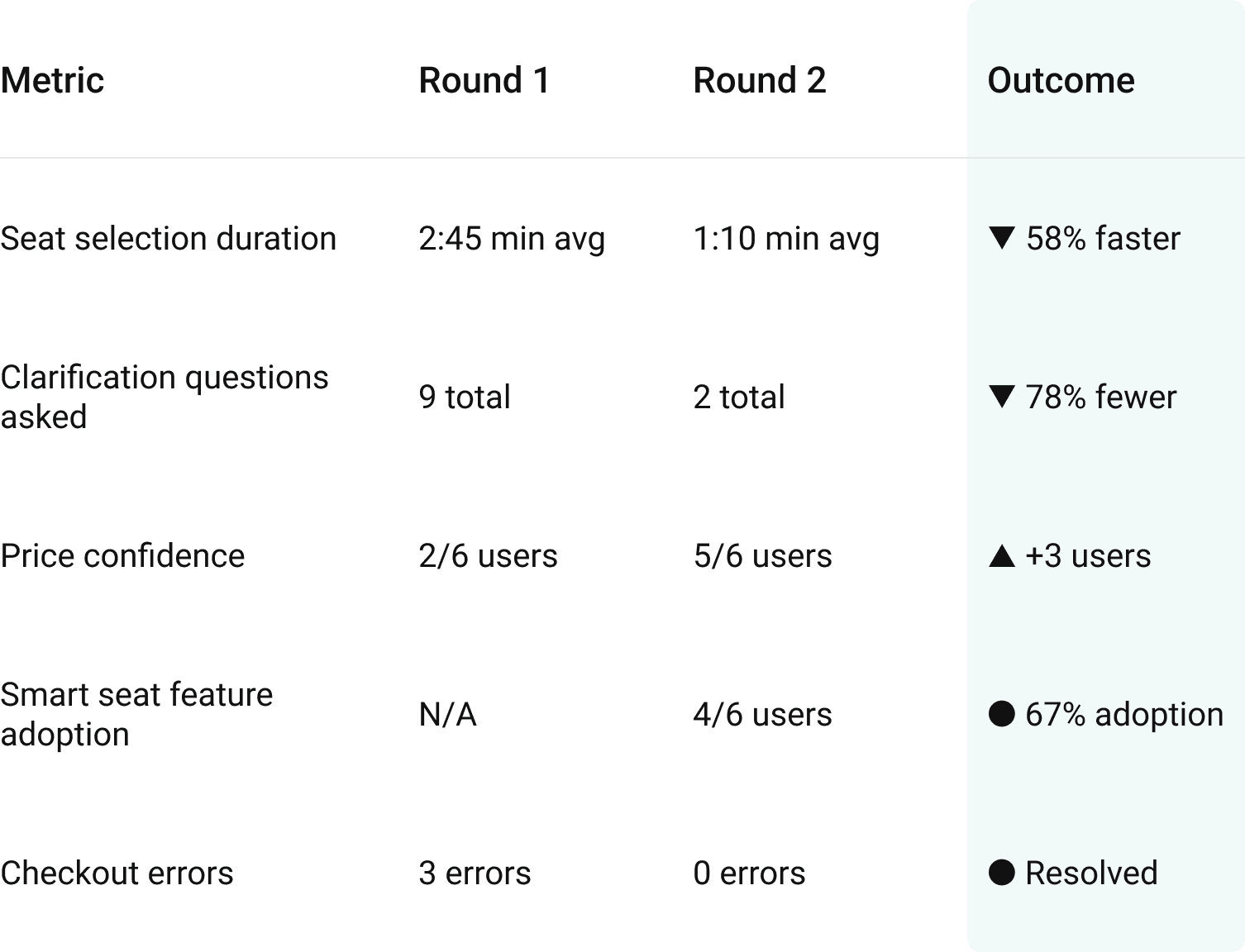
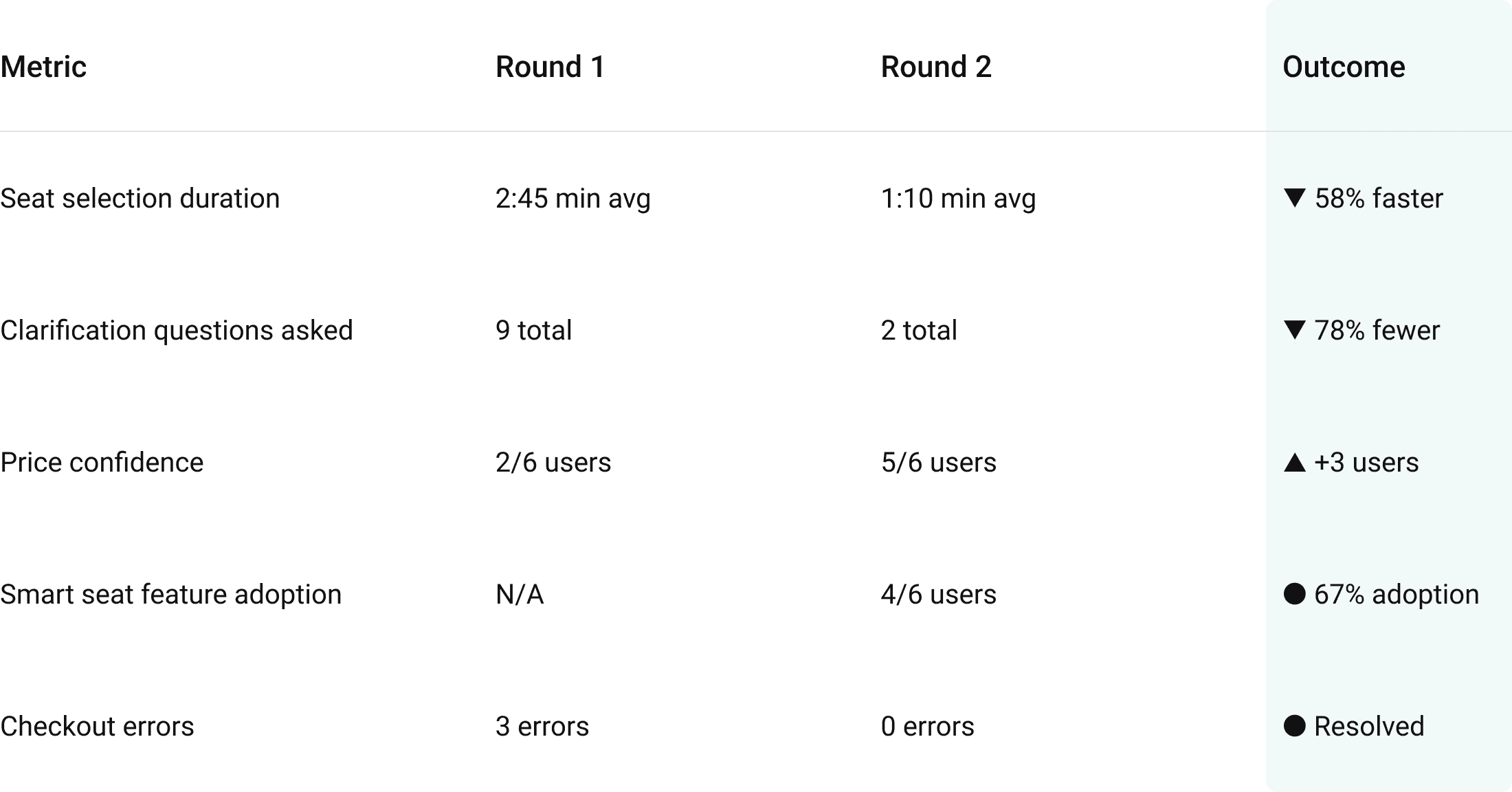
Seat Selection 58% Faster
Seat Selection 58% Faster
Seat Selection 58% Faster
I tested the FlyLow prototype with 6 users (2 returning, 4 new) to validate improvements from Round 1 and identify remaining refinement opportunities.
I tested the FlyLow prototype with 6 users (2 returning, 4 new) to validate improvements from Round 1 and identify remaining refinement opportunities.
I tested the FlyLow prototype with 6 users (2 returning, 4 new) to validate improvements from Round 1 and identify remaining refinement opportunities.
What Improved
What Improved
What Improved
Users could identify available seats quickly without feeling overwhelmed by pricing, icons or clutter
Users could identify available seats quickly without feeling overwhelmed by pricing, icons or clutter
Users could identify available seats quickly without feeling overwhelmed by pricing, icons or clutter
Users appreciated smart seat suggestions and said it made choosing seats “faster” and “less stressful”
Users appreciated smart seat suggestions and said it made choosing seats “faster” and “less stressful”
Users appreciated smart seat suggestions and said it made choosing seats “faster” and “less stressful”
What Still Needed Refinement
What Still Needed Refinement
What Still Needed Refinement
Users were unsure what “Calmest seats” meant. Some interpreted it as quiet, others as less turbulence or fewer children nearby
Users were unsure what “Calmest seats” meant. Some interpreted it as quiet, others as less turbulence or fewer children nearby
Users were unsure what “Calmest seats” meant. Some interpreted it as quiet, others as less turbulence or fewer children nearby
Users wanted clearer confirmation of what was included before paying at checkout
Users wanted clearer confirmation of what was included before paying at checkout
Users wanted clearer confirmation of what was included before paying at checkout
These insights informed final adjustments, including “Calmest Seats” to “Quietest seats” and making the full price breakdown visible at checkout without opening the basket.
These insights informed final adjustments, including “Calmest Seats” to “Quietest seats” and making the full price breakdown visible at checkout without opening the basket.
Usability Improvements (Round 1→Round 2)
Usability Improvements (Round 1→Round 2)
Usability Improvements (Round 1→Round 2)
Final Screens
Final Screens
Final Screens
Flight Selection
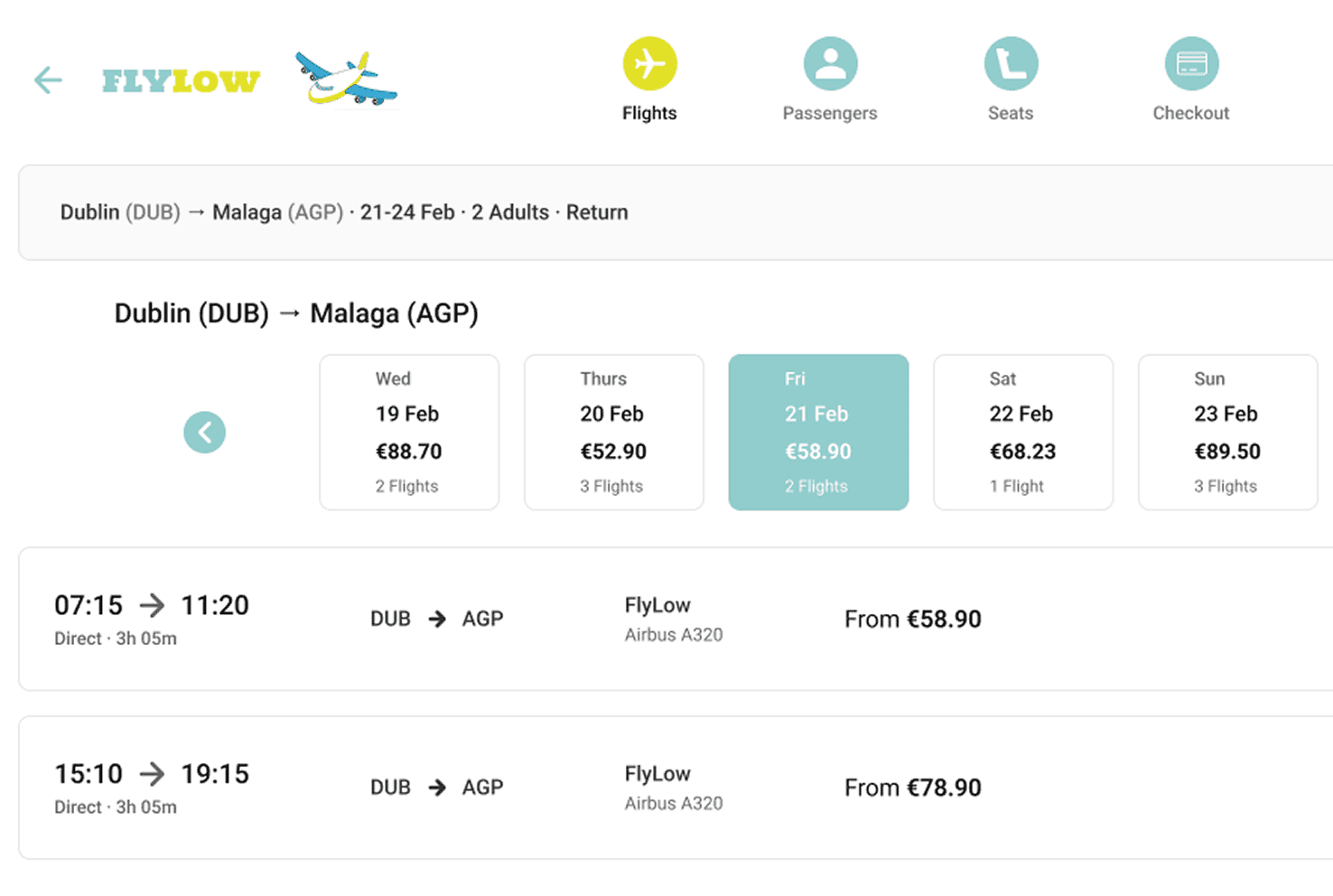
Daily price previews in the date carousel let users spot cheaper days instantly without reloading or opening filters
Typography and spacing emphasize what matters most (time → city pair → price), guiding users naturally through the decision
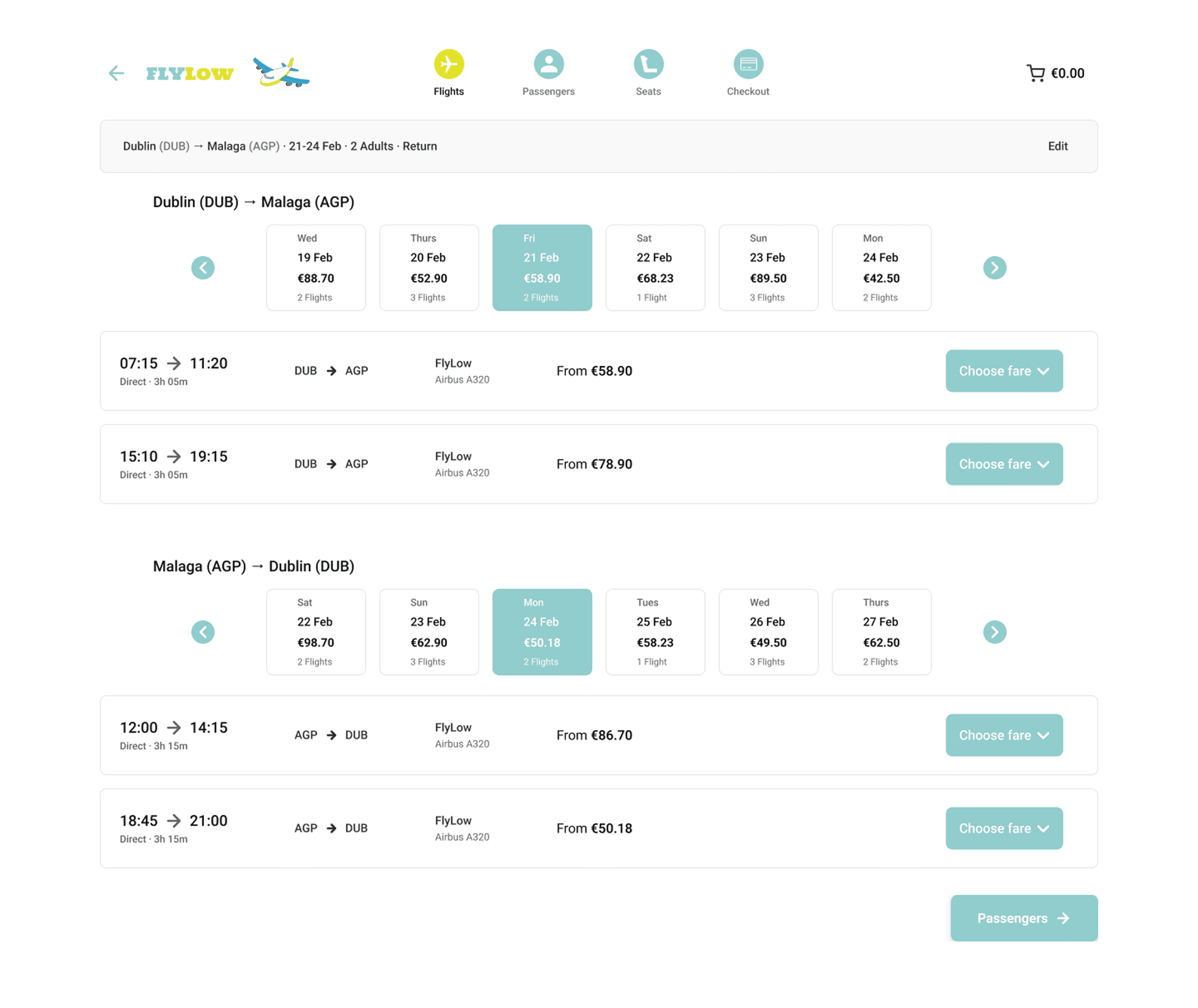
Flight Selection
Flight Selection
Daily price previews in the date carousel let users spot cheaper days instantly without reloading or opening filters
Daily price previews in the date carousel let users spot cheaper days instantly without reloading or opening filters
Typography and spacing emphasize what matters most (time → city pair → price), guiding users naturally through the decision
Typography and spacing emphasize what matters most (time → city pair → price), guiding users naturally through the decision
Seat Selection
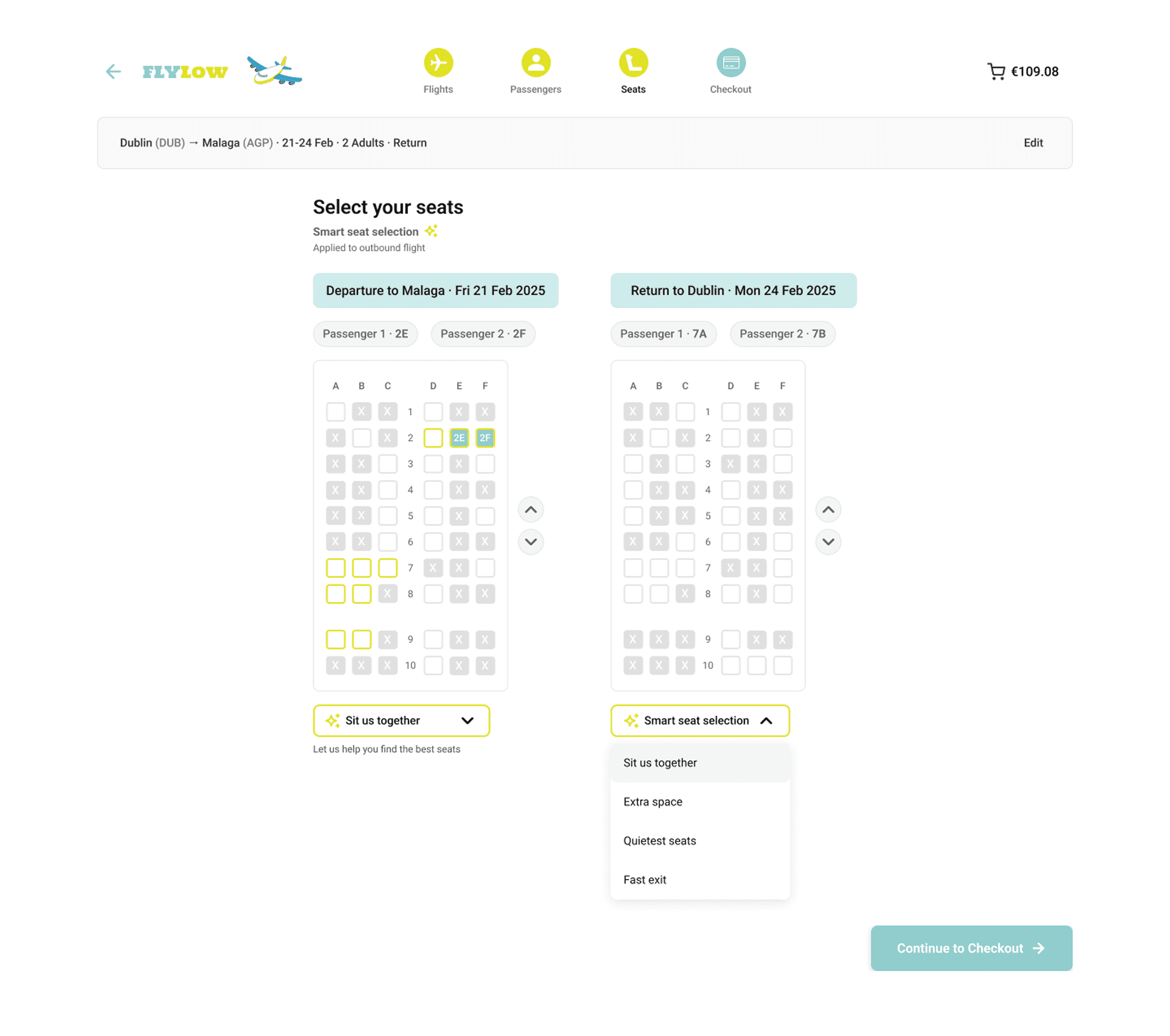
Seat Selection
Seat Selection
Dual seat maps on one screen let users choose outbound and return seats without extra steps, reducing interaction friction
Dual seat maps on one screen let users choose outbound and return seats without extra steps, reducing interaction friction
Dual seat maps on one screen let users choose outbound and return seats without extra steps, reducing interaction friction
Smart seat selection dropdown offers guided recommendations (e.g. Sit us together) supporting confident choices without overwhelming users
Smart seat selection dropdown offers guided recommendations (e.g. Sit us together) supporting confident choices without overwhelming users
Smart seat selection dropdown offers guided recommendations (e.g. Sit us together) supporting confident choices without overwhelming users
Checkout
Checkout
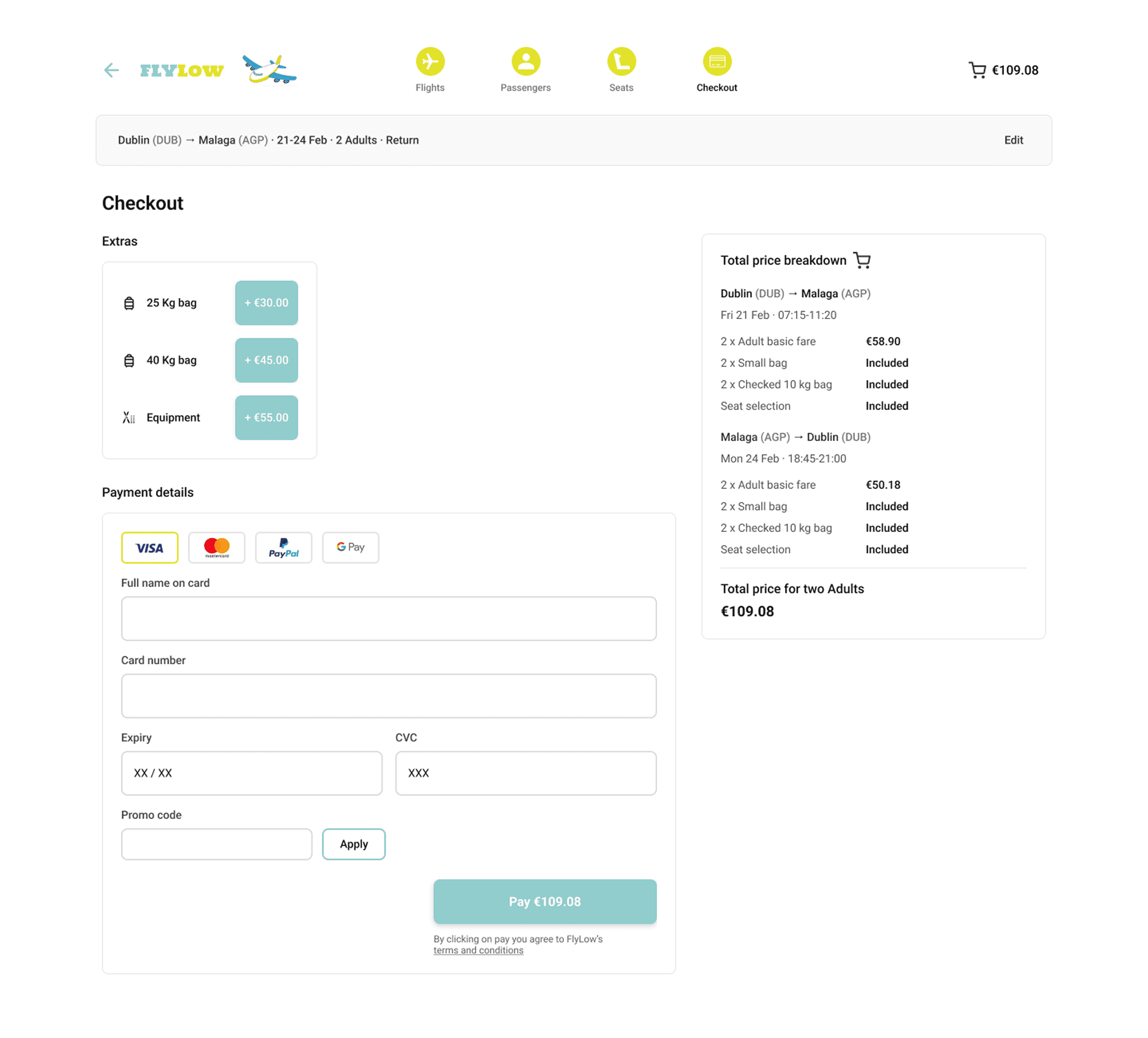
Price breakdown panel stays visible without opening the basket, improving cost transparency at the decision stage
Price breakdown panel stays visible without opening the basket, improving cost transparency at the decision stage
Extras and baggage grouped cleanly and above payment details, allowing users to finalize add-ons without being redirected or interrupted
Extras and baggage grouped cleanly and above payment details, allowing users to finalize add-ons without being redirected or interrupted
Interactive Prototype
Interactive Prototype
Interactive Prototype
Reflection
Reflection
Designing FlyLow highlighted how both quantitative and qualitative insights can directly drive better design — from simplifying flight comparison to clarifying pricing and reducing friction at checkout.
Designing FlyLow highlighted how both quantitative and qualitative insights can directly drive better design — from simplifying flight comparison to clarifying pricing and reducing friction at checkout.
Exploring an AI-assisted seat feature showed that automation can genuinely help when it’s thoughtful and optional: it made choosing seats faster and less stressful, without compromising control. With AI becoming more common in consumer tools, this felt like a realistic, future-forward enhancement rather than a flashy add-on.
Exploring an AI-assisted seat feature showed that automation can genuinely help when it’s thoughtful and optional: it made choosing seats faster and less stressful, without compromising control. With AI becoming more common in consumer tools, this felt like a realistic, future-forward enhancement rather than a flashy add-on.
If I had more time, I’d extend FlyLow beyond desktop and explore how the experience adapts to mobile, where tighter constraints and quick interactions make smart seat selection even more valuable. Overall, FlyLow reinforced that simple, user-centred improvements — backed by real input — are what turn a concept into a genuinely useful product.
If I had more time, I’d extend FlyLow beyond desktop and explore how the experience adapts to mobile, where tighter constraints and quick interactions make smart seat selection even more valuable. Overall, FlyLow reinforced that simple, user-centred improvements — backed by real input — are what turn a concept into a genuinely useful product.
Reflection
Designing FlyLow highlighted how both quantitative and qualitative insights can directly drive better design — from simplifying flight comparison to clarifying pricing and reducing friction at checkout.
Exploring an AI-assisted seat feature showed that automation can genuinely help when it’s thoughtful and optional: it made choosing seats faster and less stressful, without compromising control. With AI becoming more common in consumer tools, this felt like a realistic, future-forward enhancement rather than a flashy add-on.
If I had more time, I’d extend FlyLow beyond desktop and explore how the experience adapts to mobile, where tighter constraints and quick interactions make smart seat selection even more valuable. Overall, FlyLow reinforced that simple, user-centred improvements — backed by real input — are what turn a concept into a genuinely useful product.